In her 1913 poem, Sacred Emily, Gertrude Stein said, A "[r]ose is a rose is a rose is a rose". This quotation has been paraphrased in many different contexts, all carrying with it the idea of "It is what it is". Or, one is pretty much the same as the other. But when it comes to displaying your work, is it accurate to say "A portfolio site is a portfolio site is a portfolio site..."? Recently, I came across a list of 15 Free Portfolio Websites, published by Shopify. In the name of 'full disclosure', I am not receiving any sort of sponsorship or compensation for this. These reviews are my own, uninfluenced opinions. As the saying goes, "your mileage may vary".
To make - as much as possible - "all things equal", on each platform, I am going to attempt to:
Create an account
Build Three (3) individual pages
A page containing graphics and photographs.
A page containing video.
A page containing text.
Modify each page (Add an item, move an item, and remove an item).
Set a 'theme' to the site, and other styling measures.
Categorize content
View the portfolio from the perspective of an external visitor, and evaluate the result.
In her 1913 poem, Sacred Emily, Gertrude Stein said, A "[r]ose is a rose is a rose is a rose". This quotation has been paraphrased in many different contexts, all carrying with it the idea of "It is what it is". Or, one is pretty much the same as the other. But when it comes to displaying your work, is it accurate to say "A portfolio site is a portfolio site is a portfolio site..."? Recently, I came across a list of 15 Free Portfolio Websites, published by Shopify. In the name of 'full disclosure', I am not receiving any sort of sponsorship or compensation for this. These reviews are my own, uninfluenced opinions. As the saying goes, "your mileage may vary".
To make - as much as possible - "all things equal", on each platform, I am going to attempt to:
Create an account
Build Three (3) individual pages
A page containing graphics and photographs.
A page containing video.
A page containing text.
Modify each page (Add an item, move an item, and remove an item).
Set a 'theme' to the site, and other styling measures.
Comedian Jeff Foxworthy came to fame saying, "A lot of people don't know if they're a Redneck or not", and came up with a test to help them figure it out. In this same vein, I've found that a lot of business owners don't seem to know whether or not they need to update their website. So if you're a business owner, here's a little test to help you figure out if you need to update your website.
"If your website has not been updated since the Bush Administration..."
In all seriousness. If your site hasn't been updated in a LONG while (or, literally, in some instances, NEVER been updated)... You might need to update your website.
If your website looks like it was designed in 1996 (or, as a few cases I've seen, where the site actually WAS designed in the mid or late 90's, and while the content has been updated, the design of the site hasn't changed in over 20 years!
"If your website is still displaying Logos, that the company they're for has updated more than three times..."
It is important to remember, your website is very literally an extension of your store. It honestly surprises me how many business owners who go to such lengths to make sure their store looks clean, sharp, modern, and up-to-date, are completely content to have a website that looks like it was created a decade ago, by their 15-year-old Nephew with a pirated copy of Microsoft FrontPage 98, and a copy of "HTML For Dummies" they checked out of the school library. Statistics show that over 80% of shoppers do online research before making a purchase. What that means is, your website is most likely what is going to be making that critical first impression of your business. What is your site saying about your company?
"If your website loads slower than your kid doing household chores..."
Statistics show that a visitor to a website will decide within the first 8 - 11 seconds, whether they will stay, and further explore the site, or leave and go elsewhere. So if your site is still loading after 10 seconds, a lot of your visitors are probably already gone.
"If it's harder to find something on your website than finding an Amish family in Las Vegas..."
If your visitor isn't at least well on their way to what they're looking for within (generously) the first 12-15 seconds after arriving at your site, chances are strong that they will leave, and move on to another site to find what they're looking for.
I've had some fun here, but the points I make are very serious. Your website is as much a critical business tool as your sign out front (Which brings to mind the point of Logos, but I'll save that for another article). I'll close with this thought. Even in 2024, there are business owners who don't believe that their website "speaks" for their company. Yet stop and think how many times you've been somewhere and heard someone telling the cashier (or the manager), "But your website says..." Your website is the voice of your company. What is your site saying about you?
As a Creative Professional, like most of you, I am always looking for ways to bring in business, make contact with prospective clients, and such. So when a Contractor friend of mine told me about Thumbtack and how he had gotten a number of jobs through them, I figured I would give them a try myself. After having used them for several months, I felt it was appropriate to share my experience. More recently, LinkedIn has launched a similar service, called ProFinder, so I will discuss my experience with both services.
I apologize from the start. I know this will not be a "brief" article. Let me qualify this by saying, this is MY experience. As the expression goes, "Your mileage may vary."
Since I first dealt with them, I'll start by talking about Thumbtack.
I suppose I should start off by answering the question, "What IS Thumbtack?" According to Wikipedia's answer when I googled that question, "Thumbtack is an online service that matches customers with local professionals. Currently, Thumbtack lists 1,100 types of services in categories such as home, wellness, events, and lessons." How does it work? Well, let's say your prospective client needs... to use myself as an example, we'll say they need a Website (Though Thumbtack claims to match providers for 1,100+ services). So they go to Google and enter, "Web Designer [your town]". Chances are good that Thumbtack is going to come up somewhere on that first page. And with a link that says, "The best Web Design Companies in [your town] (with Free Estimates)", it is pretty likely that a prospective client is going to at least take a look to see what they're about. Once on Thumbtack's site, the client is asked for their location (Zip Code). Next, they're told how many professionals of that type are in their area, and they are asked what service(s) are needed. In our example, it asks what type of website you have or would like: Personal, Blog, Social Network/Community, E-Commerce or Business/Non-Profit. (I'll finish going through the whole process, and then comment on it.) They select their category and are asked if they have a preferred platform (Squarespace, WordPress, Wix, Weebly, Shopify, or "What the web designer recommends" are the listed options). The next question asks if they will be providing "some", "most", or "all" of the content for the site, or if they would like the designer to create the content for you. They are then asked about working arrangements: "Do you want the designer to come to you, will you go to them, or is a phone or online meeting acceptable?" Next, it gives them a generic, "Anything else?" block where the client can add any notes/comments/requests or anything not otherwise mentioned. Their location (Zip Code) is confirmed, they enter their email address, and that's it... From there, their system takes the request, looks in their database, and sends that request to every professional registered with their service, who have listed themselves as providing the desired service and has stated they serve the client's location.
NOW, things start to get "interesting". Now, "the race begins!" Because while the request goes out to multiple professionals, only the FIRST FIVE professionals to respond are able to submit their response to the client. Yes!, That means that you may very well have taken the time out of your day to read over the request (and we'll talk more about that in a moment), process the information however you happen to do so, prepare a response, and attempt to submit it, only to be told, "Sorry! Five others have already responded to this person." Which means that depending on where you are, and what sort of service they are requesting, you stand a strong chance of doing nothing more than wasting your time. Add to this, the fact that from the moment they send you that request, you have 24 hours to respond. Which means, yes, you may very well go through that whole process, submit your response, and be told you can't respond because time ran out! (I've had both of those happen to me, more than once.)
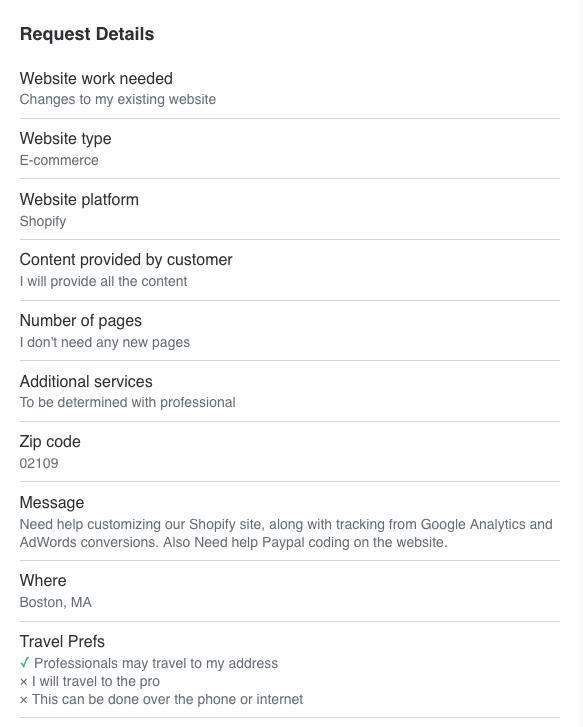
OK, Let's talk about the customer request. In case you didn't pick up on it as I went through the process above, probably 98 times out of 100, the information you receive will be "cryptic" at best. Here's an example of a typical Web Design request that I receive from Thumbtack.
Let's review. Right from the top, we see just how cryptic and devoid of information this is. Work needed? "Changes to my existing website." OK. This is, in all but the most basic senses, completely useless information. This can mean anything from, "I want you to go in and replace the old picture of me on the 'About' page with a new one that I will provide." to, "I'd like to completely change the visuals of my site." About the only thing we actually can gather is that at least based on what the client says, they aren't needing any new pages created. They tell us it is an E-Commerce Site (which we probably could have gathered from the fact that it is on the Shopify platform.) Customer will provide all content. This can be a blessing or a curse. Most of you who have done this sort of work know this can mean anything from, "I have Camera-Ready Text and Artwork" (Yeah, I know, the term, "Camera-Ready" shows how long I've been doing this stuff.) to, "I've got a couple lines of concept text scratched on a napkin from lunch, and a few pictures I took from a competitor's website that I expect you to turn into a beautiful web page." Let's go on... Additional Services: "To be determined with professional". Translation: I've got a laundry list of additional stuff I want to be done, and I'll tell you about it once you've been hired." OR "I have NO IDEA what I want or need, and you're going to have to hold my hand and draw information out of me, every step of the way." And of course, the "Message" is that "Anything Else?" block I mentioned above. "Need help customizing our Shopify site" That's a nice broad description. This could mean anything from, "I'm completely new to all this, and I can't figure out how to get my business name on the first page of the site." to, "I'd like something that will intercept the customer's request when they click to order a particular product, and render one of 40 possible intermediary responses, based on an algorithm that I've written, which may provide them with new information, update the shopping cart, or simply return them to their order..." But let's continue, "...Tracking from Google Analytics, AdWords Conversions..." First off, these are again, extremely broad concepts. Do they need help implementing Google Analytics onto their Shopify site? Or is there some detailed marketing report that they need to be gleaned from their existing GA setup? "AdWords Conversions". Again, What do you mean? Well, with all of this, we fall right into the middle of at least one of the major issues with Thumbtack. In a "Normal" situation, the prospective client finds my website on Google, or another of my clients refers them, and they call me or e-mail me. We can TALK! If I have questions, I can ask them, "Can you explain to me what you mean when you say _______?" They can ask ME questions. We can communicate, I can make sure that we're on the same page, and THEN, I sit down, and work up a quote/proposal. NOT WITH THUMBTACK! On Thumbtack, as I said, I've got what they give me in that request, and I've got whatever's left of that 24 hour time period to make my best attempt at translating the request, and prepare a response that I'm hoping they'll actually RESPOND TO! Now, to be completely fair, there are a couple other factors that do come into play here. 1) Once I submit a response, the customer has 24 hours to actually open and view your response. If they don't do so within that time, Thumbtack will refund your credits. What? I didn't mention credits? Oh yes. That's how Thumbtack makes their money. While it is free for the customer (Remember, right on that Google Search, they say, "...with free estimates"), each professional pays a certain number of credits for each proposal they submit. How many credits it takes to submit a proposal varies, depending on what sort of project it is, as well as how many requests of that particular type have come through recently. How much is a credit? Well, that too varies, depending on how many you buy at a time, how you purchase, etc. so the short answer is, there's really no easy way of knowing. (Note: To be completely fair, I just looked at some of the recent Thumbtack requests that I've received, and they DO now state a price to quote, however, in the name of full disclosure, the request shown above has a cost of $30.06 to quote. (Yes, for that one project)). 2) When I submit a response, I actually have three options as to how I respond. I can quote them my hourly rate, I can quote them a flat fee for the whole project, or I can choose to ask for more information. HOWEVER, this isn't the magic bullet that it might, at first appear to be. In all honesty, this is actually just another opportunity to shoot yourself in the foot. In the Thumbtack Environment, you are most likely going to be dealing with small home-based businesses, or folks with an "idea they're playing with". In other words, people who have never dealt with a Creative Services Agency before, and are operating on a shoestring budget. So when you leave a response quoting them $95+/hour (and the other professionals give comparable quotes), the color drains from their face, and after they regain consciousness, they abandon the whole idea, or they decide to go with that place they saw on Facebook that says they'll do it for $5. Either way, they're not going to respond to your proposal, whether by, "Thank you, I've chosen to go another direction", "OMG! I had no idea it was so much!" or even a polite, "...and the horse you rode in on." You can leave Follow-Up messages, offer to quote a flat rate if you'd originally given your hourly rate (or vice-versa), or ask for more information. They're not going to respond. Giving an hourly rate quote is also problematic, because not only have you given them what they consider a high price, but they have no clue how long what they are wanting is going to take, so the hourly rate isn't a lot of help to them. However, trying to come up with a Flat Project Rate quote is difficult at best, when you have only vague ideas at best, of what the project entails. "So, why don't you just use the 'Ask for more information' option, and get the information you need, and then quote them?" you ask. Well, that would seem like the ideal solution, however, my experience has been that in at least 90% of cases, when I chose to respond by asking for more information, I got no response whatsoever. Of the remaining 10%, there were the, "I'll check on that and get back to you..." responses, which never get back to you, or the rare cases where they actually DO respond, giving you the information you ask for, you then prepare and submit a price... and... never hear from them. And Thumbtack STILL charges you the fee to make the quote, whether you quote hourly, flat rate, or ask for more information. I would say that probably 97% of all proposals I submitted via Thumbtack ended up sitting, waiting for customer response (even after follow-ups, etc.) roughly 2% of them actually responded with some form of, 'i have chosen another provider.", and maybe 1% of the time did my proposals end up leading to a paying project. Couple this with the fact that you are receiving "blind" requests. For example, "Joseph R. needs Web Design in Boston, MA". No company name, no contact information. Obviously, this is so that you won't just cut out the middleman and contact the client directly, and Thumbtack makes their money. Yes, once you've paid your fees, you get a name, and an e-mail address or phone number, however Thumbtack does no vetting of any kind, and more than once I have found the contact information provided to be bogus. Complaints to Thumbtack are largely pointless. They are quick to point out that they are there only to provide an "introduction" between the customer and the professional, and once you have submitted a proposal, that "introduction" has been made, they feel their job is done. Thumbtack shows an A+ rating with the Better Business Bureau, however, they show 82% negative reviews, which appear to be largely from dissatisfied professionals.
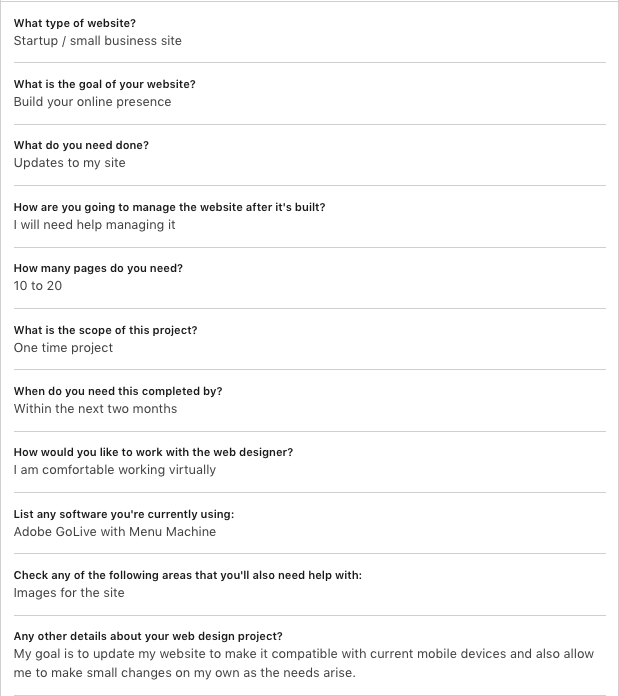
In October of 2015, LinkedIn launched a similar service they call, ProFinder. Shortly after launch, I was contacted by a member of the ProFinder team and invited to participate in the new service, as well as asked to share my ideas. I talked with them at length, shared my experience with Thumbtack, and made suggestions as to ways they could improve in areas that Thumbtack had fallen short. These ideas were gladly received, and I was invited to try ProFinder, and let them know what I thought. I was given 10 free proposals, after which I would have to pay. In their favor, where Thumbtack charges the professional for each proposal they submit, with LinkedIn, for service providers and freelance professionals, "your first 10 proposal responses through ProFinder are free to submit so you can get a sense for how the platform and the process works. After 10 proposals, a LinkedIn Premium Business subscription is necessary for unlimited responses to project requests. The Premium Business subscription costs $59.99 per month, or you may wish to purchase annually and save up to 25%." While one of the items I shared with the ProFinder team was Thumbtack's lack of information on requests, here is an example of a request from ProFinder.
As you can see, ProFinder uses much the same "fill-in-the-blanks" forms as Thumbtack, and thus, the requests look quite the same. They likewise give a 24-hour period to respond and allow only the first five professionals to submit their proposals.
How does ProFinder compare to Thumbtack? As I said, ProFinder gave me 10 free proposals to "try it out". The results, after having submitted those Ten proposals? Four of them still sit "Unread" after anywhere from Seven months to a Year now, Three of them were simply "Declined" with no further comment from the client, One was "Viewed", and then never responded in any way (again, in spite of Follow-up requests, etc.) and the remaining two responded with, "I'm currently reviewing all of the proposals and will get back to you shortly." (clearly, a canned response, as both of the responses were word-for-word identical). Both of them were six months ago and haven't been heard from since.
So, I've stated the problem. What do I see as the solution? Well, as I see it, the problem is, the customer doesn't have any, "skin in the game". They request the service, they get their responses, and they have no reason to bother responding. It doesn't cost them anything, so why should they worry, right? My suggestion? First of all, customers should be vetted. I'm not talking about anything overly extensive, but I think it is reasonable to expect that they check to make sure that phone numbers, e-mail addresses, and such contact information are valid. If the customer claims to be with, "ABC Motors", then when someone calls the given phone number, it should be answered with, "ABC Motors..." The E-mail address should reasonably have an abcmotors.com address, etc. If the customer is a private individual looking for a Personal site, or for someone to design their wedding invitations, or whatever, they should be able to call and validate that the person named as the point of contact, can be reached. And not just "validated" 30 seconds after submitting their request. Further, Neither side should be going into this "blind". If Thumbtack or ProFinder are offering to match up a Logo Designer with a client seeking their service, is it not reasonable that Thumbtack/ProFinder should KNOW what the average cost for a logo, or website or whatever service? I think that when the customer is filling out their request, somewhere in the process, they should be told, "On average, [service] costs between $X and $Y. Are you prepared to receive, and respond to quotes in this range?" I think that a deposit is also in order. If a person is prepared to pay $500-$1000 or more for a logo, is it not reasonable to ask them to put down $50-75 deposit when they make their request? And when one of the five respondents is hired, that deposit is passed along to the designer to be applied toward their fee. If the customer fails to select one of the five within a reasonable time (say, 72 hours? perhaps 5 business days?), that deposit would be divided equally among the responding professionals. If the customer should choose to hire another professional from outside of Profinder/Thumbtack, their deposit would be refunded, but only after responding professionals had been notified, (Is that not just simple, common courtesy?) and showing proof. (Which would have to be significantly more than simply them saying, "I hired someone else.")
In summary, Thumbtack, and LinkedIn ProFinder are great concepts, however, I find both have a number of large holes, which need to be patched before they can be considered worth investing money in. As I said, I am speaking only from my own experience, however having spent in excess of $1000 in Thumbtack "credits" to eventually land $300-400 worth of work just doesn't make sense. And when ProFinder's ten proposal "test drive" yields an 80% unread/non-response rate, a $0.00 financial return, and a 0% project generation rate, I simply cannot justify the expense of using either service.
In the business world, there is an etiquette. In every industry out there, there is an etiquette. On Social Media, there is an etiquette. "Etiquette" is defined as, "the customary code of polite behavior in society or among members of a particular profession or group." Poor etiquette inevitably yields negative results.
The primary element to keep in mind is what is commonly known as, "The Golden Rule" which says, "Do unto others as you would have them do unto you." It is critical to understand, this does NOT mean, "Do to others what they have done to you." it means, in short, treat others the way that you would like for them to treat you.
LinkedIn is a well-established Business Social Media site, which has been in operation since 2003, and boasts in excess of a 500 million members in over 200 countries and territories. LinkedIn was acquired by Microsoft in June of 2016. A site such as this has a number of both written and unwritten "rules". It is important to remember that while lack of etiquette in a general social media site, like FaceBook or Twitter may simply be irritating, and "only" get you unfriended/ignored/mocked, lack of etiquette in the business environment may lose you respect, it may lose you customers, or if it gets bad enough, it could cost you your job.
Let's take a look at some of the more blatant blunders in professional etiquette that we see on LinkedIn.
Connecting with strangers -
LinkedIn has a rule against connecting with people that you don't know. And while many of us tend to disregard that rule in the name of networking, that does not mean all bets are off. Connecting with someone on LinkedIn is much the same as meeting them at a party/networking event/business mixer. While it is fine to walk up to someone you don't know, and introduce yourself, just like at that party/mixer, you wouldn't (or at least shouldn't) just walk up to someone who doesn't know you from Adam, and start pitching them on your product/service. Doing so at the party, at best, they're probably going to walk away from you. "So are you saying I shouldn't discuss business on LinkedIn?" No, that's not what I'm saying. What I'm saying is, use some tact, and common courtesy. "Hello, Mr. Smith, my name is _______, I am (state what company you're with or what line of work you're in, or something to give them some idea who you are and what you're about.) I was wondering if I could talk to you about (Product/service/investment/whatever)?" and give them the chance to accept your offer. Be BRIEF/General ("...I was wondering if I could talk to you about Outsourcing some of your work?" or "...I was wondering if I could discuss a potential investment opportunity?" or whatever. This does NOT mean hit them with your whole pitch! And, like anything in the world (Business or otherwise) don't be surprised if they say, "No." And be professional and respectful if they do. They may give you some degree of explanation ("No, thank you, I already have a financial planner." or, "No, I'm sorry, we don't outsource work." or they may just say, "No, thank you." At this point you can smile, and say, "Thank you for your time", "Thank you, nice to meet you" or even, "Thank you, here's my card, if we might somehow be of service in the future." and then go. NOBODY likes to be pushed/pressured. The same should be the case Online. I can't tell you how many times I have had someone ask me to connect, and almost immediately send me a message pushing their product or service.
DO NOT (and again I say, DO NOT) send a connection ANYTHING without first asking their permission/approval. Do not send e-mail other than over LinkedIn, I don't care if they DO have their e-mail address listed in their profile. One of the fastest ways to lose a prospective client is by spamming them. In this same vein, I STRONGLY advise against joining any of the various services that your connections on LinkedIn may send you. The invitation usually says something about, "I'd like to be able to refer customers to you..." I made the mistake of joining one of these. You click the link, go through their registration process, and it asks you to somehow connect your LinkedIn account, and when you do, it sends an invitation to all of your contacts. I made this mistake once, and never again. If you want to refer customers to me, Great! Get in touch with me over LinkedIn, and we can go from there. Likewise, if I happen to know of someone I think would be a good match for your services, I'll contact you and share the information. The only thing SPAM accomplishes is irritating people.
"When in Rome..." -
When you are on LinkedIn, participate. There are a lot of great groups available on a wide variety of subjects. Great places to ask questions, share information, etc. However, please make sure that you take a moment to read whatever "Group Rules" the managers have created, and abide by them. As a member of a number of groups, as well as manager of several, I can tell you, SPAM is one of the biggest irritants there is. Most groups will define SPAM as anything that does not relate to that group (In other words, if you're in the Photoshop group, a post about how to do something in Illustrator would be considered SPAM.), anything repetitious (there is NO need to post your message, regardless of what it is, more than ONCE. People start at the top of the discussions and scroll down. If they see multiple copies of your message, most likely your messages will be flagged, and deleted. And you may be "moderated" (which means that anything that you attempt to post must be approved by a group manager before it is visible to members.) Or you may simply be ejected from the group.
There are a variety of areas on LinkedIn. There is some etiquette that is specific to a specific area, while others are more universal. You would be wise to take a few moments and learn "the ways of doing things" before you get involved. This applies to LinkedIn as well as any other Social Media or website. Using some simple common sense and common courtesy can make the difference between you being seen as a contributing member, and you being seen as a spammer or annoyance or worse.
Here's an opinion poll of sorts. I'd like to hear yours.
We've all heard the old sayings like, "Never stop learning", "All knowledge is good knowledge", "Knowledge is power!" and the like. However, especially in today's economy, we have to question if that is 100% true.
Now I realize, this topic could go in 150 different directions, and probably have twice as many potential responses. I'm going to try to stay relatively specific here however.
We all know that folks with a Bachelor's degree typically make more than those with an Associate degree, who typically make more than those with a High School diploma. And I do believe that at one time, someone with a Masters degree or a Doctorate would unquestionably make more than someone with a Bachelors degree. But in today's economy, I have to question if this is still so. With things as they are today, I have to say honestly, that I know far more people with Masters degrees, who are either working jobs completely out of their field, and/or have been passed over for jobs in their field with lesser requirements, being told they were "Overqualified", and/or simply stating, "If I knew then what i know now, I would never have bothered going on for my Masters degree." In fact, it seems that unless your intent is to TEACH in whatever field, that a Masters degree is of little to no benefit. I know myself, in Graphic Design/Visual Communications, I have explored the possibility of continuing on to earn an MFA (Master of Fine Arts) degree. However, as I've looked over job postings in the field, the number of job postings that even MENTION a Masters degree… equals exactly ZERO. I'm sure there ARE jobs out there that require a graduate degree, but in the three years I've spent looking at job postings, I've yet to see one. So, here's the discussion part of this article. If you have a Masters or Doctorate degree, a) Did you get it strictly to meet the requirements of a particular job? a1)Was that job some sort of teaching position? b) Have you found the time and expense to earn the higher degree was worth the time/money?